On a GLP-1 or not
Send one photo. See yourself at your goal weight.
 Your photo
 AI preview
Then Arc, your AI coach you text like a friend, gets you there. Send it photos, screenshots and weigh-ins, and it texts you before you slip.
One photo · no app · your plan and preview before you pay · then $12.99/mo, cancel anytime
By Ryan, who built AI for FDA-regulated medical products at the world leader in medical technology.
Works with Ozempic® · Wegovy® · Mounjaro® · Zepbound® · compounded tirzepatide and semaglutide · or no medication at all
Then it does everything else.
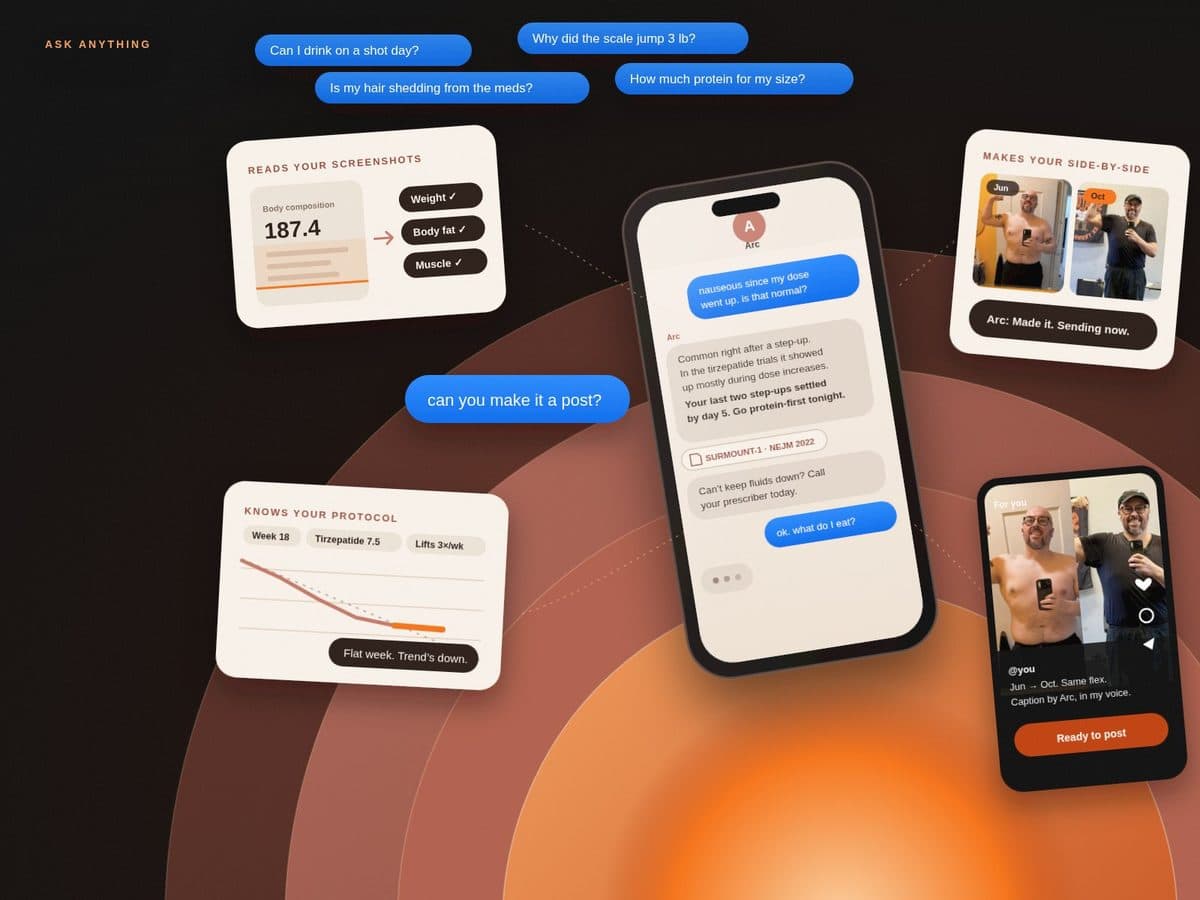
Arc is a coach you text like a friend. Send a photo or screenshot and it reads it, checks the research, and turns your progress into posts.
It remembers your whole week.
Arc keeps a running picture of you: every weigh-in, dose, meal, photo and late night. It doesn’t wait to be asked. When the pattern says something, it texts first.
Arc: Looking back at what you’ve shared this week: late dinners Tuesday and Wednesday, under 6 hours of sleep both nights, and your weigh-in jumped the next morning each time.
Arc: That’s water, not fat. Your 4-week trend is still down 3.1 lb.
Arc: Want me to move Wednesday’s check-in to 6pm so dinner lands earlier?
You: yes. that helps.
Ask anything. It checks the research before it answers you.
Training and recovery science, the trial evidence, how the medication actually works. Arc searches the medical literature, then answers for your body, your dose, your week.
Training and recovery
Muscle retention, sleep, training load, metabolic adaptation.
The evidence
Trials, side effects, what the research does and doesn’t say.
The medication
How GLP-1s work, titration logic, timing, interactions.
And you
Your record decides the answer, not an average patient.
You: nauseous since my dose went up. is that normal?
Arc: Common right after a step-up. In the tirzepatide trials, nausea showed up mostly during dose increases, because the drug slows how fast your stomach empties.
Arc: Your last two step-ups settled by day 5. Go small and protein-first tonight, and skip the late heavy meal.
Arc: Can’t keep fluids down? Call your prescriber today.
You: saw a tiktok that ozempic makes your hair fall out. should I be worried?
Arc: That one’s everywhere this week. The shedding people describe usually comes from fast weight loss itself, not the drug. It’s called telogen effluvium and it typically grows back.
Arc: You’re losing at a steady pace and your protein is solid, so you’re in a good spot. I’ll keep an eye on it.
Checks the viral claim before you panic.
GLP-1s move at the speed of the internet: new studies, FDA updates, viral claims, price changes. Text Arc what you saw. It checks the live web and the research, and tells you what’s real and what it means for you.
Your progress, turned into content.
Arc lines up your photos, makes the side-by-side, and writes the caption in your voice. Every transformation becomes a post worth sharing.
 Jun 3
Jun 3 Oct 13
I made SnapBody because I needed it. — Ryan
You: ok that’s wild. can you make it a post?
Arc: Made it. Sending the side-by-side now.
Arc: Caption’s ready too: “Jun → Oct. Same flex. Didn’t white-knuckle it.” It’s waiting in your dashboard to post to TikTok.
“I had been using MyFitnessPal, but on tirzepatide, tracking calories wasn’t the issue — balancing nutrition, side effects, and optimization became my focus. SnapBody gave me a super smart companion to navigate all of that.”
Soon: quick text, refill handled.
We’re bringing medication refills into the same thread, with a prescribing partner. No portal, no hold music. Just a text to someone who already knows your whole story.
Arc: Heads up: your vial runs out Thursday.
Arc: Want me to send your refill request to your prescriber now?
You: yes please
Arc: Done. I’ll text you when it ships.
What people ask Arc first.
Does Arc see my phone?
No. Arc is a number you text, and it works from what you send it. Connecting TikTok is optional and off by default. If you do, Arc learns from your history and can automate replies.
Isn’t this just ChatGPT?
A general chatbot starts every chat from scratch. Arc keeps every weigh-in, photo, dose, and check-in you send, so each reply builds on your actual record. And it texts you first when your trend starts to drift.
Is the goal preview really free?
Yes. Send one photo during setup and you see an AI preview of you at your goal, plus your plan, before you pay anything.
What does it cost?
You see your plan and your AI goal preview before you pay. Then it’s $12.99/mo. Cancel anytime from your account, no lock-in. Reply STOP to any text to stop messages.
Do I need to download an app?
No app, ever. A quick setup gets you your plan and your goal preview, and gives Arc your goal, protocol, and pace. Post your journey on TikTok? Connect it during setup and Arc starts from your videos too. After that, every check-in happens in the texting app already on your phone.
Do I have to be on a GLP-1?
No. Arc coaches weight loss with or without medication. If you’re on Ozempic, Wegovy, Mounjaro, Zepbound, or a compounded protocol, it knows the dosing, timing, and side effects too.
Will it tell me what to do with my medication?
It helps you think through timing, progress, and what looks off. If side effects or something unusual shows up, Arc flags it and tells you to loop in your prescriber. It does not make dosage calls for you.
Today a coach. Soon, much more.
The coach you text
Reads the photos and screenshots you send. Remembers everything. Texts first on drift and dose days. Researches PubMed and the live web. Makes side-by-sides and posts to TikTok.
A specialist panel on your case
A physiologist, a clinical researcher and a drug developer, as AI agents working your case together. Real-time alerts on new research, FDA news and what’s going viral. Refills by text.
Health intelligence for everyone
A superintelligent friend for your body, one text away. Any medication, any diagnostic, any goal.
A friend who checks the research before it answers.
Get your plan and see yourself at your goal before you pay.